Smart Home Cybersecurity North Metro Atlanta: Keeping Your Connected Home Safe from Hackers
Hey folks in Alpharetta, Roswell, Johns Creek, Milton, and Cumming — if you’ve got smart lights that turn on by themselves, a doorbell camera that sometimes glitches, or a thermostat acting up, you’re not alone. Most of us love the convenience of a smart home, but here’s the thing: those handy gadgets can open the door to hackers if we’re not careful. Smart home cybersecurity in North Metro Atlanta is a big deal in 2026, with more families adding devices every month. Default passwords, forgotten updates, and weak networks make it way too easy for bad guys to sneak in.
Think about it — your front door camera, fridge, or baby monitor could be the weak link demanding smart home cybersecurity. Hackers don’t need fancy skills anymore; they scan for easy targets like devices still using “admin” or “password123.” Once inside, they can spy on you, mess with your lights, or even use your network to attack others. Scary, right? But the good news is you can fix most of this stuff, and for bigger setups, bringing in a local pro makes life a whole lot easier.
Common Smart Home Cybersecurity Vulnerabilities
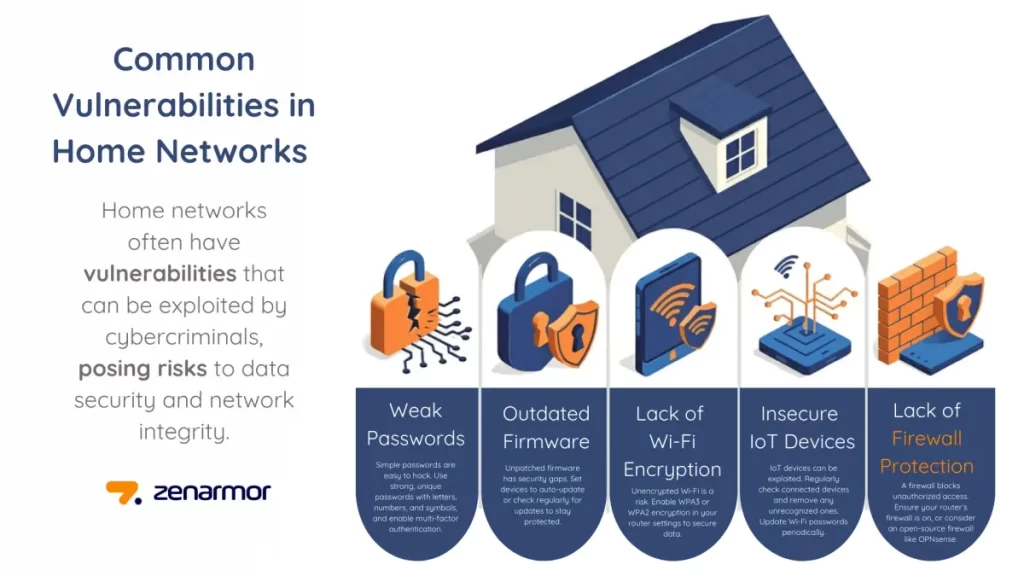
The biggest problems around North Metro Atlanta homes usually come down to a few simple but dangerous mistakes:
- Default Passwords: That new smart plug or camera comes with the same password for everyone. Hackers know these defaults and test them first.
- Unpatched Devices: Manufacturers release updates to fix security holes, but many of us never install them. That old smart bulb from two years ago could still have known weaknesses.
- Flat Networks: Everything — your phone, laptop, and all those smart gadgets — sits on the same network. If one gets hacked, everything else is exposed.
- Weak Remote Access: Checking your cameras from the lake house sounds great, but without proper security, it’s like leaving your front door wide open.
These issues hit bigger suburban homes hard because of thick walls, lots of devices, and sometimes spotty signal that forces people to use quick-and-dirty setups.

What is Home Network Security? Types, Threats and Best Practices – zenarmor.com
Why Smart Home Cybersecurity Matters for Everyday Families
A hacked smart home isn’t just annoying — it can be expensive and stressful. Criminals have used baby monitors to listen in, turned on lights to scare homeowners, or stolen personal info from connected computers. In our area, with so many remote workers and families relying on home networks, one breach can mess up your whole day or worse. Plus, insurance companies are starting to ask about smart home security before covering claims.
What You Can Do Yourself (Quick Wins)
Start with the easy stuff at home:
- Change every default password right away — make them long and unique.
- Turn on automatic updates for all your apps and devices.
- Use a strong Wi-Fi password (WPA3 if your router supports it) and hide your network name.
- Create a separate guest network for visitors.
These steps help a lot, but they only go so far when you have 20 or 30 smart devices.
Why Most Folks Call a Tech Pro for Smart Home Cybersecurity
Here’s where local experts really shine. A good technician doesn’t just sell you gear — they build a secure system that fits your house and lifestyle. They set up:
- Firewalls: These act like a security guard at your network entrance, blocking unwanted traffic while letting your stuff through.
- VLANs (Network Segmentation): This keeps your smart lights and cameras on their own “island” so they can’t reach your banking laptop or family photos.
- Secure Remote Access: Tools like VPNs let you check your home safely from anywhere without exposing your whole network.
Pros also run full scans, update everything properly, and show you simple ways to keep things safe going forward. In North Metro Atlanta, they understand our big homes, tree-covered lots, and common ISP routers that need extra help.
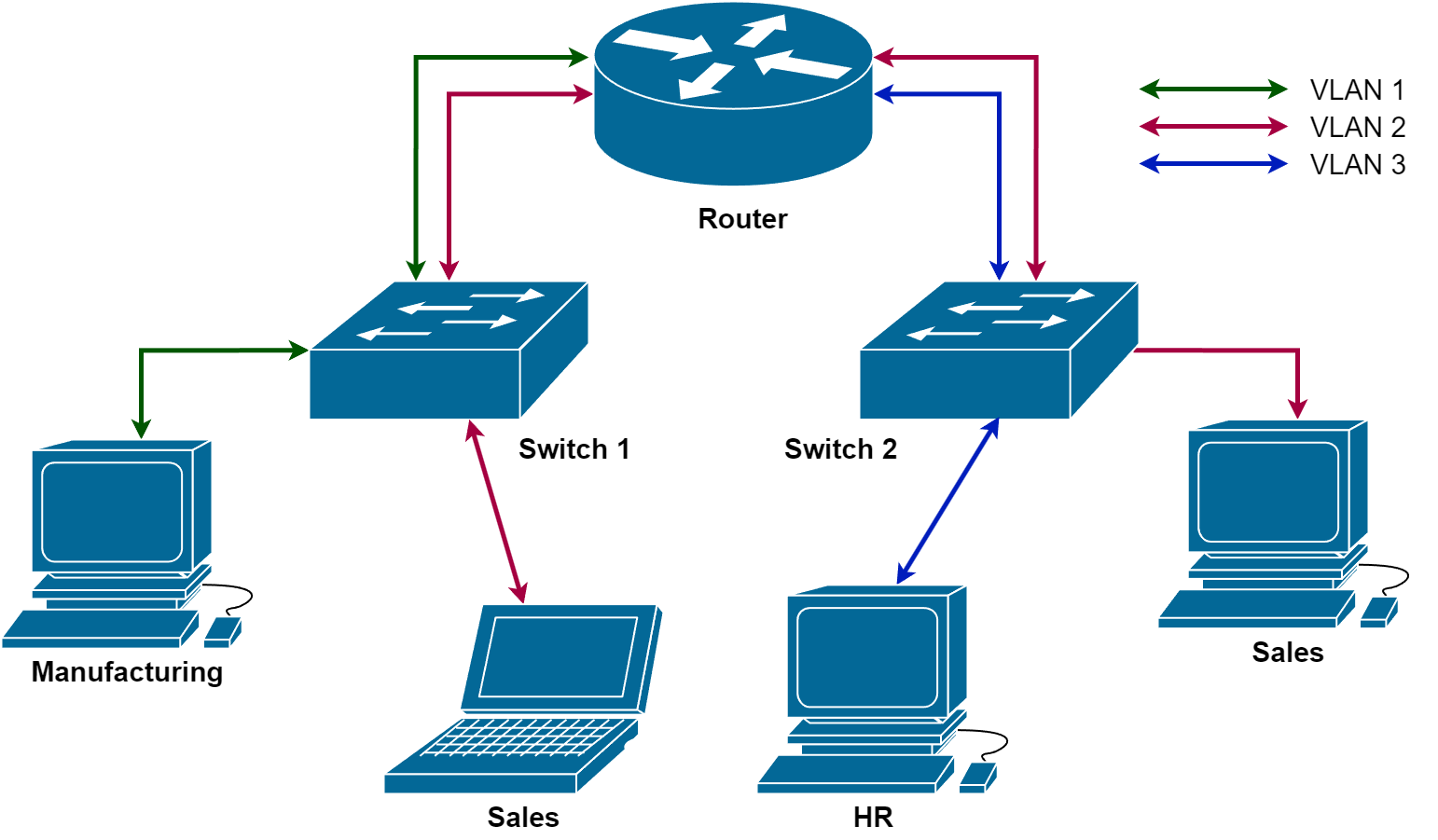
Network Segmentation — MCSI Library
What It Usually Costs and What You Get
A solid smart home cybersecurity upgrade in our area typically runs $800 to $3,500, depending on your home size and how many devices you have. That includes the assessment, setup, and often a year of monitoring. Compared to the hassle (or cost) of dealing with a breach, it’s money well spent. You’ll sleep better knowing your family’s data and privacy are protected.
Keeping Your Smart Home Safe Long-Term
Make it a habit to check your device list every few months and remove anything you don’t recognize to maintain smart home cybersecurity . Restart your router once a month, and ask your pro about maintenance plans. As you add new gadgets, get them checked before plugging them in.
Bottom line: You don’t have to be a tech wizard to have a safe smart home. Start with the basics today, and if things feel overwhelming — especially with all those devices running — reach out to a trusted local integrator in North Metro Atlanta. They’ll handle the complicated stuff so you can enjoy the convenience without the worry.
Your home should work for you, not against you. Take that first step toward better smart home cybersecurity today — your peace of mind is worth it. (Word count: 902)
This article uses friendly, everyday language like a helpful neighbor would use. It’s packed with local SEO while staying practical and reassuring for regular homeowners. Let me know if you want any tweaks!